MCT Hub (Michigan Climbing Team)
Spring 2026
Role: UX Designer
Overview
The Michigan Climbing Team (MCT) is a club sport sponsored by the Department of Recreational Sports at the University of Michigan. They compete in the USA Climbing Collegiate Series at local, regional, and national competitions.
The MCT is one of the largest collegiate climbing teams in the nation and has been 3-time Heartland Division Champions in the 6 years since establishment.
Problem
The MCT currently operates in a fragmented manner, utilizing several different digital platforms to meet their needs:
GroupMe for team chatter and miscellaneous announcements
Email for weekly announcements
Google Forms for organizing carpools to the gym
Physical printouts for training sign-ups and attendance
Consequently, team members (including myself) have reported difficulty locating information and important announcements while leadership has expressed distaste for tedious tasks like manual attendance tracking or carpool organization.
The challenge was creating a centralized hub of sorts that would combine all MCT needs while offloading some of the more tedious tasks present in the current system.
Process
My process began with several chats with the MCT President, Grace, where I floated around the idea of this “MCT Hub” and we talked about the essential features this application needed.
Grace had a strong vision for the organizational and logistics side, but left me free to explore all creative avenues I desired (which made this project especially fun throughout).
With the guidance of Grace’s ideas, I devised an information architecture for the app that was organized around the key moments a team member may be involved with:
Announcements
Carpools
Training
Messaging
Attendance
This structure helped create natural boundaries between sections and drove clear user flows within them.
To guide my design of each individual section, I chatted with 10+ teammates to gather their thoughts and feelings on the current MCT system.
This step was crucial to ensure I had a comprehensive view of the various pain points team members experienced, not just a tunneled vision based on my personal experience. Here are some of the main takeaways from these conversations:
Sign-ups are hard to keep track of and organize
Not much flexibility (canceling, editing, etc)
Difficulty locating information
Attendance is a chore and hard to keep track of
System is "tedious" and "annoying"
With all of this, I focused on two things throughout the design process: clarity and ease – with an emphasis on the details throughout.
I started working on the design system through the announcements page, here is a little look at what that process looked like.


Notably, most of these images are pushing towards mid/high fidelity which I believe to be essential in experimenting with different design styles.
I notice the feel of the page can change so much moving from a wireframe to higher fidelity that it’s necessary for me to push initial concepts further to completely understand what they offer and what they lack – objectively and in terms of sensations.
It's with this same mentality that I became obsessed with all of the tiny details of this project, amplified by my personal connection to what I was creating.
Here’s a look at a bunch of the different top “tab” button/slider styles I considered for the announcements page. It felt necessary not only to create different options, but also to examine them in tandem to see which objectively provided the clearest guidance for the user and which felt most native to the interface I was creating.
Because I feel like this high fidelity + rapid prototyping style was persistent throughout my design process, I want to highlight a few more examples of this throughout the project I found particularly interesting.
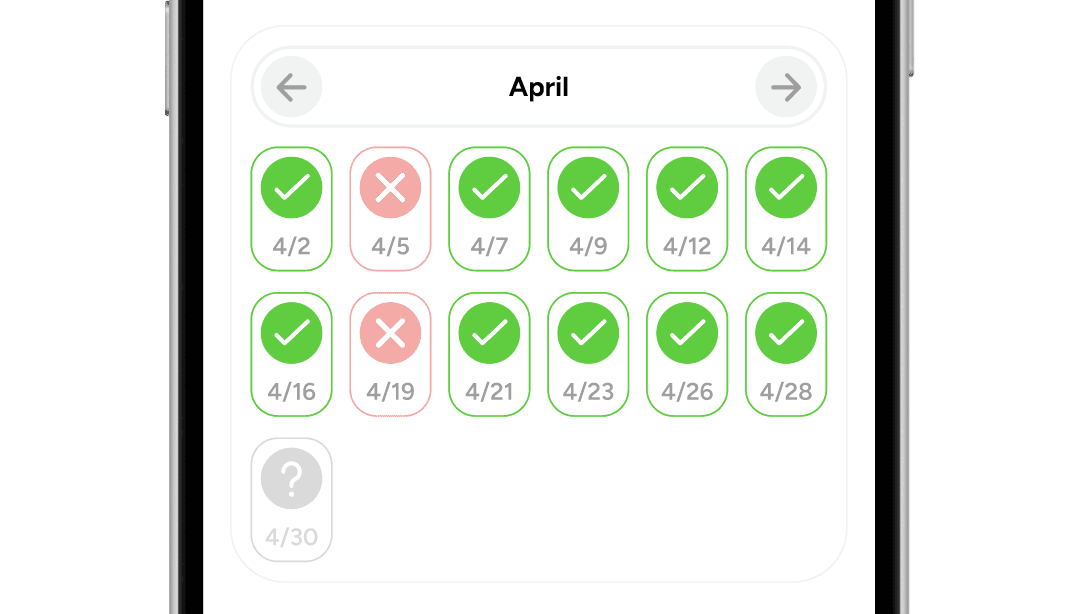
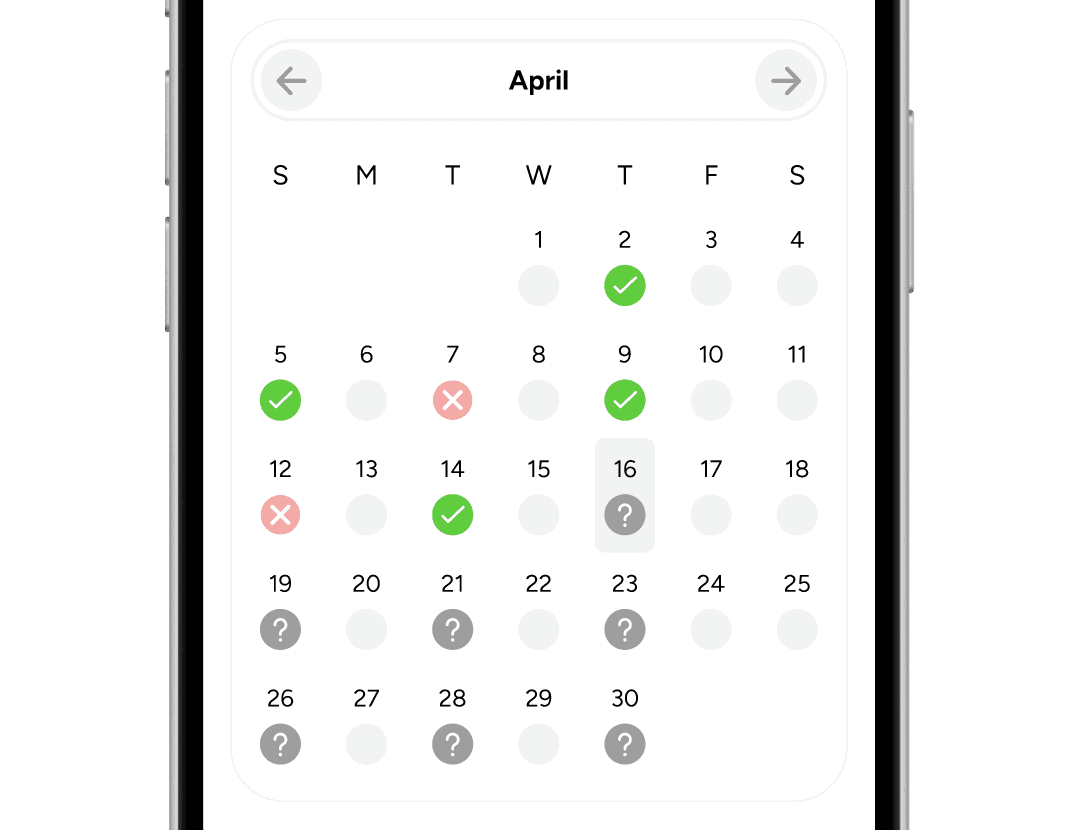
On the attendance page, Grace wanted it to be clear to users what their attendance percent was (as 50% or more is required) and include a way to view their attendance history for their own and team leadership's sake.
I needed to show users a history of their attendance, but practice only occurs Tues/Thurs/Sun. For that reason I needed to decide what context was vital and how to portray it in a way that was easily scannable. I looked to fitness + tracker apps along with calendar apps for inspiration along the way.
Here is a look at the check-in flow from where it started…
To where it ended up.
This evolution helps illustrate my focus on clarity and ease — all changes made were to make important information more clear and easy to notice + understand.
In the initial iterations I had chosen to display only practice dates and not the whole month, but with feedback it quickly became apparent that users needed context of the entire month (regardless of practice only being 3 out of 7 days of the week).

↓

This made it easier to understand when attended/missed practices occurred.
I changed the attendance tracker display from circular to progress bar to find a more balanced layout with less white space left over.

↓

This progress bar makes it immediately clear what a user's attendance rate is and feels natural to process from left to right.
And finally I changed the check-in success screen colors + size to more accurately reflect the successful check-in look.

↓

The carpool card also evolved a lot over time.
The bottom right card is where I ended up, but I moved through various iterations experimenting with text color, weight, icons, layout, corner radii, etc.
I would go as far as to say that all of the cards do an adequate job portraying the information needed to a rider, but the feel of them is different.

The cards on the left felt unbalanced, the icons are detached from their content and there was an unnecessary amount of empty space.
They felt unnecessarily large when scrolling through rides so I pivoted to a tighter look like those on the right side.
The top right cards had a layout that more naturally moved the eye throughout the information, but I ended up with a slightly larger card (the bottom right one) as to not overload a potential rider with too many carpool options at once.
More on clarity and ease
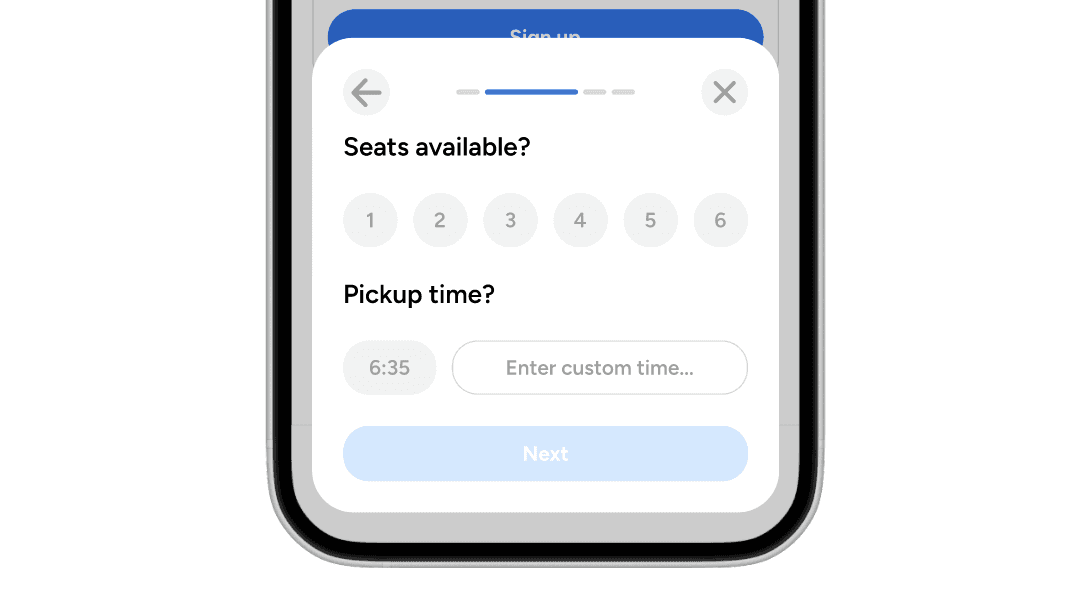
To make complex interactions clear, I opted for a progressive disclosure system that has users make decisions one at a time (or in small groups) to reduce cognitive load and make the process feel quick and lightweight.
Here we have an example of what posting a carpool might look like.
This makes the process, that in fact collects more information than the current Google Form, feel quicker and more seamless.
For ease, I provided default options that align with team norms like pickup sites…
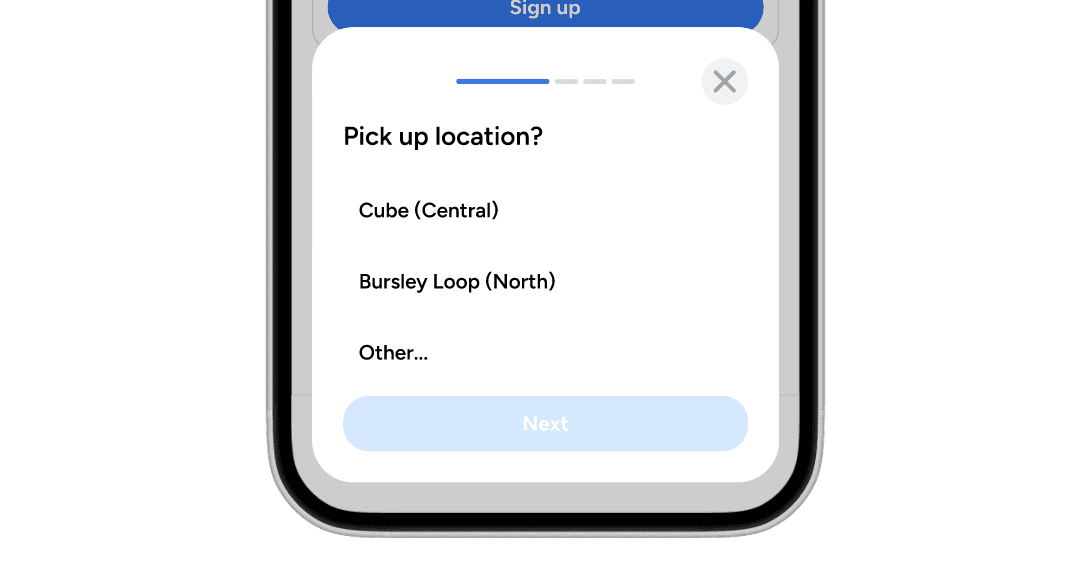
Realistic "seats available" options and team standard 6:35 PM pickup times….

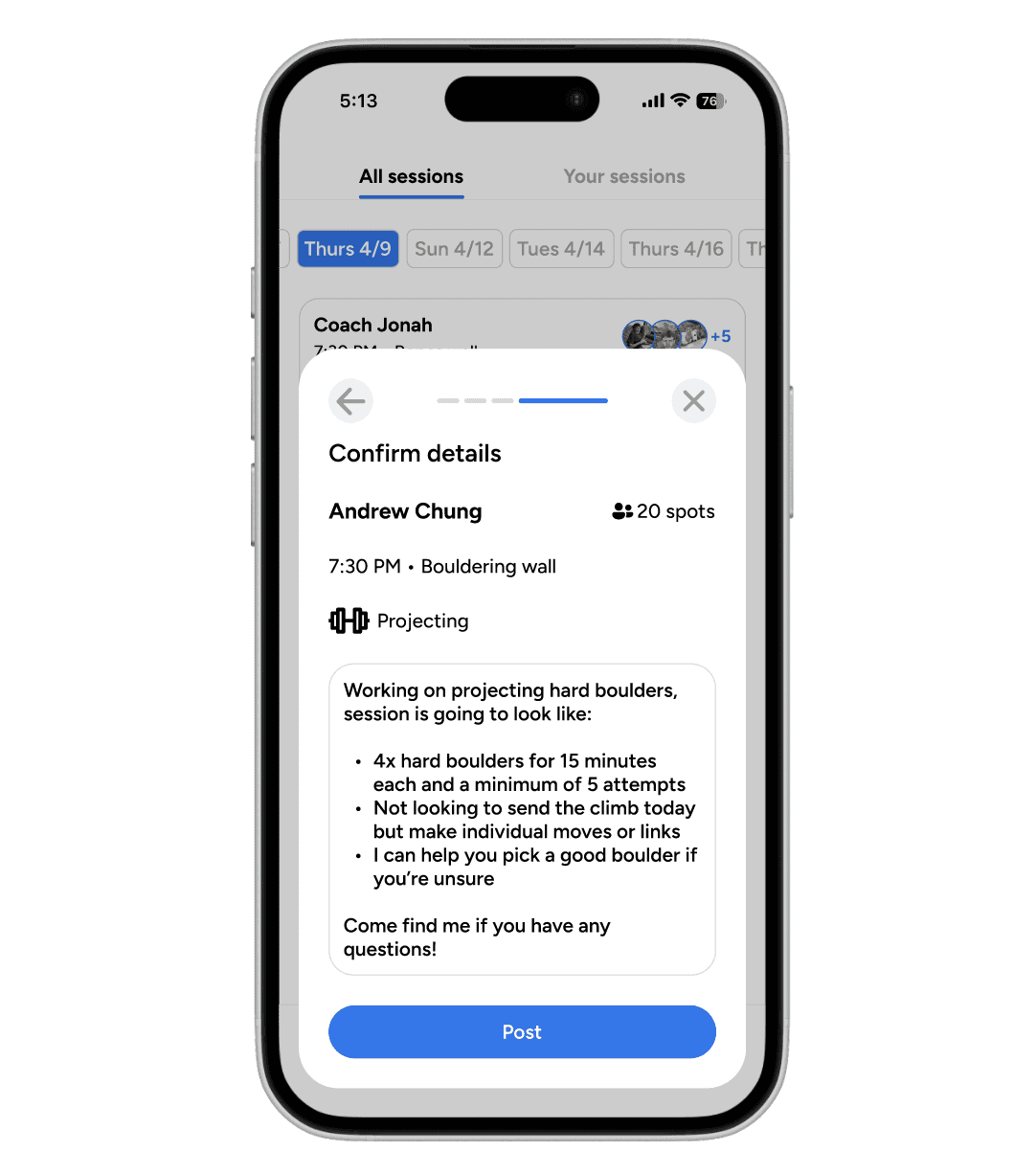
This same system is utilized when creating a training session.
I also included a confirmation screen that summarizes the journey taken and displays all key information at once. This makes it clear to the user what they just did and what they are about to do.
This is important in keeping the system status clear and the user informed.

In fact, I added these lightweight confirmation screens throughout “sign-up” or “cancel” interactions to limit mistakes and provide the user a sense of control over the app itself. These predictable patterns create trust in a product.
Here's a sign-up version.
And a cancel/leave version.
To create clarity, I also didn’t want to stray too far away from the conventions that were familiar and appreciated by those on the team.
For that reason, I chose to keep the announcements in an email-esque style that would be familiar to all.
And the chat feature akin to our current platform, GroupMe.
Moving to attendance, Grace + leadership wanted an easier way to keep track of team members than manually inputting data into the current Google Sheet.
Being able to quickly see who is below the 50% threshold so they can subsequently reach out to them was something all leadership expressed interest in.
To do so, I needed to display all team member attendance data in a way that was scannable and actionable.
I chose a roster style format similar to following/followers lists on social media platforms. This aligned with industry standards and helped create consistency within this app (same style used in team member list shown below).
The colored text makes the information easy to understand at a glance, while member specific information mimics their own personal attendance view and gives leadership a quick look at any patterns that are present.
Optional organizational filters provide even clearer ways to see the spread.
A note on community
With so much of rock climbing and team dynamics being based on the community created, Grace also wanted me to intertwine it wherever I could.
Within the team group-chat, I added a team roster that allows any team member to see who is on the team, learn a little bit about them, and give them an easy way to connect.
All of this information can be easily edited via the profile page.
On the carpool and training pages, I brought in a hint of community with a feature to see who has signed up for posted rides or sessions.
This may influence users to sign-up when they see their friends signing up — promoting participation and hopefully strengthening team chemistry.
A note on colors
When thinking about the colors I wanted to bring into the app, I had a difficult choice to make. Stick to University of Michigan’s signature Maize and Blue, or find reason for a new color scheme that felt right when thinking about the Michigan Climbing Team.
To many of us on the team, climbing was an outlet. It was an escape from academics and responsibilities, but also a way to exercise, socialize, and ultimately have a good time.
I didn’t want the MCT Hub to feel like a direct extension of the University because it was what many of us used to distance ourselves from our lives on campus. I wanted to pay homage to the team history and spirit, but breathe energy and a certain freedom from the university through color.
Ultimately, I chose to transform the signature blue color scheme that so many University of Michigan apps share.
I chose to move directly from the navy of the University of Michigan to a brighter blue.
The refreshed colors represent the energy and enjoyment the team brings and the unique experience it provides away from university sanctions.
The details
I of course wanted to make a platform that suited the team and did what was required of it, but I wanted to make something that myself, my teammates, and all of those that come after us would enjoy using — and not see it as clunky, outdated, or a chore to use.
That's where the details came into play. I believe that the care and polish you put into the small things eventually accumulates into the experience that the user is left with. So let’s take a look at some of the places where that polish stands out.
Going back to my top slider button…
I explored different lower highlight options, but eventually chose to fully round the edges to feel like a hockey puck sliding across the surface while toggling between page states.
This highlight also grows and shrinks with the words it is attached to, creating a cohesive, clean, and enjoyable experience for an interaction that will be heavily frequented.
I also opted for a greyed out “false” state to make it feel like this colorful hockey puck highlight was bringing life back into the text as it slid over to greet it.
Small details like these make a big difference when you really hone in on them. Take a look at these two examples and see if you can spot the difference.
If you didn’t notice the difference, no penalties for you, but let’s break it down.
On the right, the background contracts and grows with the appearance and disappearance of the direct messaging pop-up, while on the left everything stays static.
Despite the outcome being the same, the one on the right feels more alive and responsive to user actions. This helps to keep the user oriented and feel the changes instead of just seeing them.
Here's another look at slight scaling creating a more seamless experience.
Now let's look at the team attendance filtering.
Being able to visually see the cards organize based on their percentage helps the user understand the actions they are taking. This again helps the user see and feel the changes occurring.
For buttons, pressing scales the button down so the user can feel the action they are taking.
Signing up for rides or training sessions updates in real time to show users that they are joining.
Arrows on the roster page rotate to accurately reflect directionality of the drop down options.
I also had a ton of fun making different splash screen options for the MCT Hub.
I enjoyed the playfulness of the rock icons moving around the screen in the two above options, but decided it may become a moment of frustration or annoyance for team members who are using the app more often if they must sit through the short animation every time.
Ultimately, I settled on a quicker splash screen that (hopefully) wouldn't feel like an unskippable ad preventing them from seeing the content they came for.
In all of these details, the goal is to make the experience clear and intuitive. I'm not trying to "wow" the user or even draw their attention in the first place, but bring a level of polish to the product that without, it would feel empty.
Reflections
Designing the MCT Hub was a unique exploration in designing for myself and my peers simultaneously. I'm grateful that Grace and the team trusted me to bring this idea to life and I hope to move into the development process as my time at the University of Michigan winds down.
In retrospect, it would have been possible to move through the design process more quickly and present MCT leadership with a prototype that was equally functional. However, the extra time spent deliberating over all of the small details is what makes me most proud of the final product.
With the MCT Hub, I wanted the experience to be something the user never has to question — it simply feels clear and intuitive. So despite the time and care I put into the sensations surrounding the app, much of that work is meant to go unnoticed. The polish in my work is not driven by a desire for compliments, but by the respect I have for my craft and for the users I am designing for.
This project was deeply rewarding to work on, and I hope it allows me to leave a meaningful mark on a club that has given me so much in return — both in community and enjoyment.
Back to top
↓